
Reorder Planning for Plume 2g Disposable (2026): MOQ Breaks, Carton Counts & Shipping Windows
Built for B2B buyers who want fewer stockouts, fewer “surprise delays,” and cleaner receiving at the warehouse.
What “reorder planning” really means for Plume 2g in 2026
Reorder planning for disposable empty hardware is not just “buy more before it runs out.” It’s a scheduling problem across three moving parts: (1) your MOQ breaks (what quantities unlock usable pricing), (2) your carton counts (how inventory physically moves), and (3) your shipping windows (how long it takes to land new stock where you fill, label, or distribute).
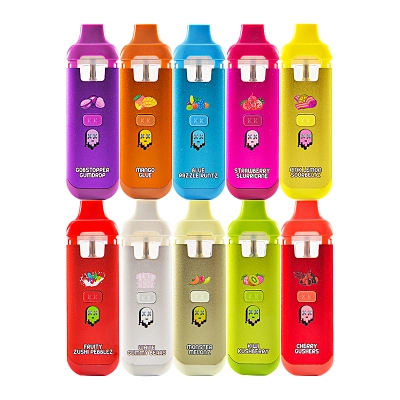
If you’re managing the Plume family, start from the hubs you’ll reference in internal docs and buyer messages: Plume, Plume dispoable vape, and digital screen vape.
The goal of this post is simple: help you pick reorder quantities and dates that your operations team can execute without last-minute freight upgrades or “we can’t receive that mix” warehouse pushback.
Step 1: Choose your supply lane first (Stock vs. Made-to-Order)
Treat Plume reorders as two different lanes, each with its own calendar:
- Lane A — In-stock / warehouse batches: faster replenishment, less customization risk.
- Lane B — Fresh OEM/ODM production: better control over packaging/variants, longer lead time.
Why this matters: the lane determines whether your biggest risk is “selling out” (stock lane) or “missing a launch date” (production lane). You should set reorder triggers differently for each.
Step 2: MOQ breaks (the part most teams under-document)
2.1 Don’t ask for “the MOQ.” Ask for the MOQ layers.
Professional RFQs separate MOQ into layers. If you collapse these into one number, you discover the real MOQ later—after design changes, packaging decisions, or variant expansion.
Use this three-layer model in every reorder conversation:
- Shell MOQ: minimum run for the device body + internal architecture.
- Packaging MOQ: minimum for the packaging format (box style, inserts, print).
- Variant MOQ: minimum per variant (colorway, window, screen-icon version, etc.).
2.2 A practical MOQ-break ladder you can plan around
Many 2g programs plan volume in “ladders,” because price breaks and production attention improve as you climb:
- ~500 pcs: viable for pilots and regional tests (higher unit cost, faster learning).
- ~1000–2000 pcs: a standard wholesale zone where you can run multiple SKUs without chaos.
- ~5000+ pcs: best value for stable programs; easier to reserve capacity.
One rule that prevents costly misunderstanding: define whether MOQ is per artwork, per flavor set, or per total order—in writing, on the PO.
If you’re building a broader customization plan (logos, print processes, packaging), keep a reference page handy: MOQ roadmap.
2.3 Stock MOQs can be different than production MOQs
In some Plume listings you’ll see lot-based quantities for stocked items (for example, “500pcs/lot”). Treat stock-lane reorders like inventory pulls: you’re buying what exists, not funding a full setup. In production lane, you’re funding setup, scheduling, and packaging coordination—so your MOQ logic must be stricter.
Step 3: Carton counts (turn “units” into real warehouse math)
Reorder planning fails when the purchasing team plans in single units, but the warehouse receives and picks in cartons. Your system needs a simple packaging hierarchy and fixed case-pack rules.
3.1 Define the hierarchy once
- Unit: one empty device
- Inner: a smaller box grouping (often used for fast picking)
- Master carton: the ship/receive unit for pallets and inbound scans
3.2 Standardize “units per inner” and “inners per master”
One proven approach is to standardize master carton counts (example pattern: 10 inners × 50 pcs = 500 shells). This gives your receiving team a quick scan-to-verify process and makes cycle counts less painful.
3.3 Don’t mix variants inside inners
If you run multiple screen or artwork variants, make it operational: keep one variant per inner, label the short side of the inner clearly, and keep master labels aligned to PO line items so bulk picks don’t cross-mix.
For a deeper operational pattern (variant codes, scanning flow, lot label essentials), bookmark: carton logic guide.
3.4 Your reorder trigger should be carton-based
Once carton counts are fixed, define reorder triggers in master cartons, not pieces:
- Min on-hand (MC): the absolute floor you will not cross
- Reorder point (MC): when you place the next PO
- Target max (MC): the level you aim to return to after replenishment
Carton-based triggers make your warehouse and finance teams happier because it aligns receiving, pallet space, and inbound workload with the plan.
Step 4: Shipping windows (schedule with buffers, not hope)
Shipping windows are the difference between “we placed the PO” and “we can fill/ship to customers.” You need to track three time blocks:
- Order processing time (payment → ready-to-ship status)
- Ex-factory / packing time (for production-lane orders)
- Transit time (express vs air vs ocean + local dispatch)
4.1 Processing time: plan it as a real calendar block
Even stock orders can require processing time (confirmation, packing, dispatch scheduling). Put this into your reorder schedule so your team doesn’t treat “paid” as “shipped.”
4.2 Transit: choose a window that matches your risk
For international replenishment, think in windows rather than single dates:
- Express: best for urgent replenishment and pilots
- Air freight: mid-cost, mid-speed replenishment
- Ocean freight: best cost for large programs, longest lead time
4.3 A simple planning table (you can paste into a SOP)
| Lane | Best for | What you must lock | Typical risk |
|---|---|---|---|
| In-stock + Express/Air | Preventing stockouts | Carton counts + version match | Cost spikes |
| Production + Air | Seasonal pushes | Artwork + packaging + variants | Schedule slips |
| Production + Ocean | High-volume stable programs | Everything locked early | Port delays / longer cash cycle |
Step 5: Build your reorder formula (simple and effective)
You do not need a complex ERP to start. Use a basic reorder point model:
Reorder Point (units) = Average Daily Demand × Total Lead Time (days) + Safety Stock
Then convert the result into master cartons:
Reorder Point (MC) = ceil(Reorder Point (units) ÷ Units per Master Carton)
Example (illustrative numbers)
- Average demand: 180 units/day
- Total lead time window: 25–40 days (choose your lane)
- Safety stock: 7 days of demand (1260 units)
- Master carton: 500 units
If you plan on a 30-day lead time: ROP = 180×30 + 1260 = 6660 units → 14 master cartons (rounded up).
The point isn’t the exact numbers. The point is that your reorder trigger becomes explainable—and repeatable.
Step 6: The reorder brief (what to send so quotes come back fast)
The fastest reorders happen when your brief is structured. Use this format:
- SKU family: Plume 2g (2ml-class) + screen version
- Lane: stock vs production
- MOQ layers: shell MOQ / packaging MOQ / variant MOQ
- Carton rules: units per inner + inners per master + “no mixed inners”
- Ship window: desired arrival week + acceptable mode
- Labeling: lot/batch, artwork ID or version ID on cartons
If you operate multiple variants, add a “no surprises” rule: once you approve the screen/icon map and carton rules, do not change them mid-run. Freeze specs first, freeze case packs second, scale volume third.

0 Comments